
Use cases
Automate QA testing when a PR is raised
Use automatic QA validation to test pull-request behavior against acceptance criteria and review the reports and evidence before merging.
Validate behavior as well as code
Use automatic PR testing when a change needs proof that the intended behavior works. Code Review inspects implementation and risks; QA exercises scenarios and reports actual results. QA can run alongside Code Review, subject to workspace capacity.
Prepare the test context
Connect GitHub or Bitbucket and an agent provider in Integrations. Select the repositories for your product and let Factory setup prepare them automatically. Review and merge any required setup PRs in their respective repositories. Configure models in Agents and compute in Settings.
Provide clear acceptance criteria in the PR or linked ticket, the intended test target, and any required setup context. Relevant runtime credentials belong in the supported environment configuration, rather than the PR description.
| Example criterion | Scenario to exercise |
|---|---|
| An empty search shows “No results found.” | Complete a search that returns no matches. |
| A pending search remains a loading state. | Observe the screen before the search completes. |
| A failed search shows a distinct error. | Exercise a failed request and inspect the recovery path. |
These are illustrative criteria. The actual run must record what it executed and what happened.
Enable automatic QA validation
- Open Settings and find Automatic pull-request checks.
- Enable Enable automatic QA validation.
- Confirm the provider webhook, selected repositories, and readiness messages.
- Use a PR in a selected repository to check that the expected QA run starts.
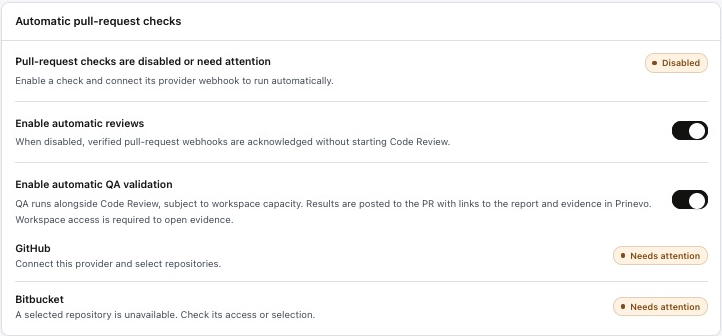
Results are posted to the PR with links to the report and evidence in Prinevo. Workspace access is required to open evidence.
Inspect acceptance criteria and attached evidence
Open Verification, select the run, and expand the relevant criterion and scenario. Compare expected behavior with actual results. Review the accepted criteria document and execution results document, then inspect their supporting evidence.

- Execution results: what ran, what passed or failed, and any blocked or untested behavior.
- Screenshots: useful states such as empty results, validation, or a layout issue.
- Video: an interaction sequence when a recording was captured and published.
- Supporting evidence: test output, logs, API results, or scenario records where relevant.
A media count does not prove the relevant behavior passed. Confirm the evidence is available, current, and tied to the criterion you are reviewing.
Use the result to decide the next action
Fix reported defects, resolve blockers, and rerun affected checks on the updated revision. Do not treat a blocked check, missing evidence, or an unexecuted scenario as a pass. Merge through the normal repository approval process when the required review and verification are complete.
Read the QA guide · Understand artifacts and evidence · Run Verify manually for one PR