
Get started
From a ticket to a pull request
Bring the ticket’s requirements into a session, choose the delivery lane, and carry acceptance criteria through implementation, review, and verification.
Before you start
Connect GitHub, enable the target repositories, and configure the required agents. Gather the ticket URL, description, acceptance criteria, constraints, and target base branch. Provide the ticket text when the agent cannot access the tracker.
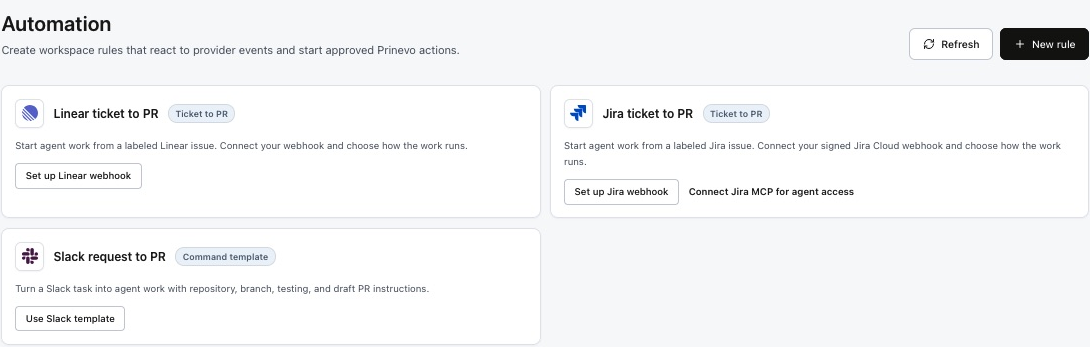
Automatic Linear intake: configure an Issues webhook and a label-based rule on the Automation page. Follow the Linear automation guide. You can also use the manual handoff below.
Take a ticket to a pull request
- Prepare the request. Include the issue identifier and link, user-facing outcome, acceptance criteria, and relevant designs.
- Choose a lane. Use Quick lane for a clear low-risk change, Quick Agent lane for bounded work needing independent review, or Full lane for requirements and design through verified delivery.
- Start Build. Select repository hints and submit the request. Answer scope questions before implementation proceeds.
- Guide the work. Review the artifacts and decisions requested by the lane. Keep feedback in the session so it remains attached to the work.
- Inspect the PR. Confirm repository, base branch, scope, ticket reference, and verification evidence. Resolve review findings before treating the change as ready.
- Approve the next action. Follow your configured merge and release process. A generated PR is a reviewable delivery artifact.
quick agent lane: Implement the change described in LINEAR-123.
Ticket URL: [paste ticket link]
Ticket description: [paste the relevant text]
Repository and base branch: [name and branch]
Acceptance criteria: [observable outcomes]
Constraints: [compatibility, design, and scope]
Required checks: [test commands or expected verification]
Create or update a draft pull request, link the ticket, and include
review and verification evidence. Leave merge for approval.
For a larger feature, select Full lane and use the same request details. Confirm the scope and architecture at the decision points presented by the run.
Automate a focused task on an existing PR
Use single-node mode when you need one specialist to inspect a PR without starting the whole feature workflow. Type @, select Code Review or Verify from the agent picker, then provide the exact PR URL and expected output.
@Code Review review [PR URL] against [ticket URL or pasted criteria].
Inspect the latest revision. Report actionable findings with locations,
severity, and the behavior they affect. Identify missing evidence.

@Verify validate [PR URL] against these acceptance criteria: [...].
Run the relevant checks and report results, blockers, and remaining gaps.
Do not merge the pull request.
Choose the actual specialist from the picker; the examples describe the message to send after selection. Confirm the resulting evidence applies to the latest revision. If code changes after review, rerun the affected review and verification work.
Define event-driven automation
For Linear issue events, follow the webhook setup and label-rule steps in the Linear automation guide. For automatic PR review and testing, enable the checkboxes in Settings → Automatic pull-request checks. Use the checklist below to confirm the intended scope and delivery controls.
| Decision | Recommended setup |
|---|---|
| Trigger | Choose an explicit ticket-ready status or label, or a specific PR event. Document which event starts work. |
| Scope | Map the tracker project to approved repositories and a base branch. Exclude unrelated tickets and PRs. |
| Lane or specialist | Route implementation requests to a delivery lane; route a focused PR review or verification request to its specialist. |
| Required inputs | Require acceptance criteria and readable source context. Send incomplete requests for clarification. |
| Duplicate handling | Associate the ticket and event with the existing run or PR. Verify repeated events do not create duplicate work. |
| Permissions | Grant the connection the repository and tracker access required for the approved actions. Define who approves merge and deployment. |
| Failure handling | Assign an owner for access failures, missing requirements, failing checks, and retries. Keep the failed attempt and evidence available. |
| Pilot | Test one eligible ticket, one excluded ticket, and a repeated event before enabling broader intake. |
If your installation has no supported trigger, use the manual handoff above. It still provides a repeatable ticket-to-PR workflow.
What complete looks like
- The PR references the source ticket and addresses its acceptance criteria.
- Review findings are resolved and the required checks pass for the current revision.
- The PR explains behavior changes, validation, and rollout considerations.
- The team knows who approves merge, release, and any ticket status update.
- Failures have an owner and a recoverable session.