
Run work
Automate pull-request review and testing
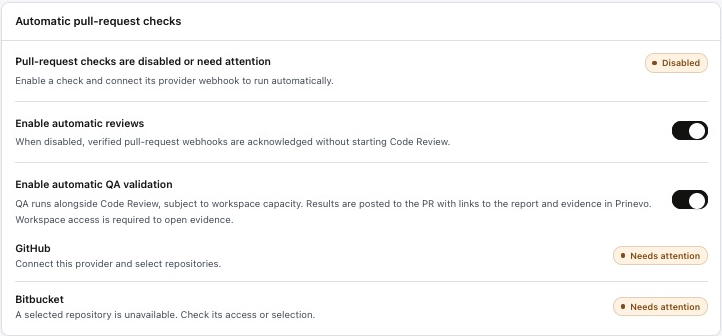
Use the checkboxes in Settings to run Code Review and QA validation automatically for pull requests. Connect the provider webhook and select repositories so PR events can reach the workspace.
Enable automatic pull-request checks
- Sign in to app.prinevo.ai and open Settings.
- Find Automatic pull-request checks.
- Select Enable automatic reviews to start Code Review from verified pull-request webhook events.
- Select Enable automatic QA validation to run QA validation for pull requests.
- Check the provider readiness messages beneath the controls. Resolve any Needs attention status before expecting automatic runs.
| Setting | What it does |
|---|---|
| Enable automatic reviews | Starts Code Review from verified PR webhooks. When disabled, those events are acknowledged without starting Code Review. |
| Enable automatic QA validation | Runs QA alongside Code Review, subject to workspace capacity. Results are posted to the PR with links to the Prinevo report and evidence. |
Connect the provider and its webhook
The checkboxes enable the checks; the provider connection and webhook deliver the events. Confirm that your source-control provider is connected, the target repositories are selected, and the provider webhook is configured. Settings shows readiness for GitHub and Bitbucket.
Use Integrations for provider authentication and connection management. Use Automation for webhook connections, signing secrets, and rules. Follow the configuration shown for your provider and keep signing secrets out of PR descriptions and chat messages.
Review the automated results
After enabling the checks and confirming provider readiness, use a PR in a selected repository to verify that the expected runs start. Review Code Review findings and the QA result. Open the report and evidence links posted to the PR; workspace access is required to open evidence in Prinevo.
QA runs alongside Code Review rather than waiting for it, subject to workspace capacity. Review and testing automation produces findings and evidence; it does not grant merge or deployment approval.
- Confirm the results refer to the intended PR and current revision.
- Resolve actionable review findings and failing checks.
- Inspect missing or blocked evidence before treating QA as complete.
- Follow your repository’s merge checks and approval process.
If automatic checks do not start
| What you see | What to check |
|---|---|
| Checks disabled or need attention | Confirm the desired checkbox is enabled and its provider webhook is connected. |
| Connect provider and select repositories | Complete provider authentication in Integrations and select the intended repositories. |
| Selected repository unavailable | Check access and repository selection, then recheck provider readiness. |
| QA waiting to run | Check workspace capacity and the current run status before creating duplicate work. |
| Evidence link requires access | Sign in to the correct workspace. Ask an owner to invite the reviewer if needed. |