
Run work
Choose models and reasoning
Give each specialist the execution setup its job needs, then save one governed configuration for future runs.
Set defaults
- 1Open Agents
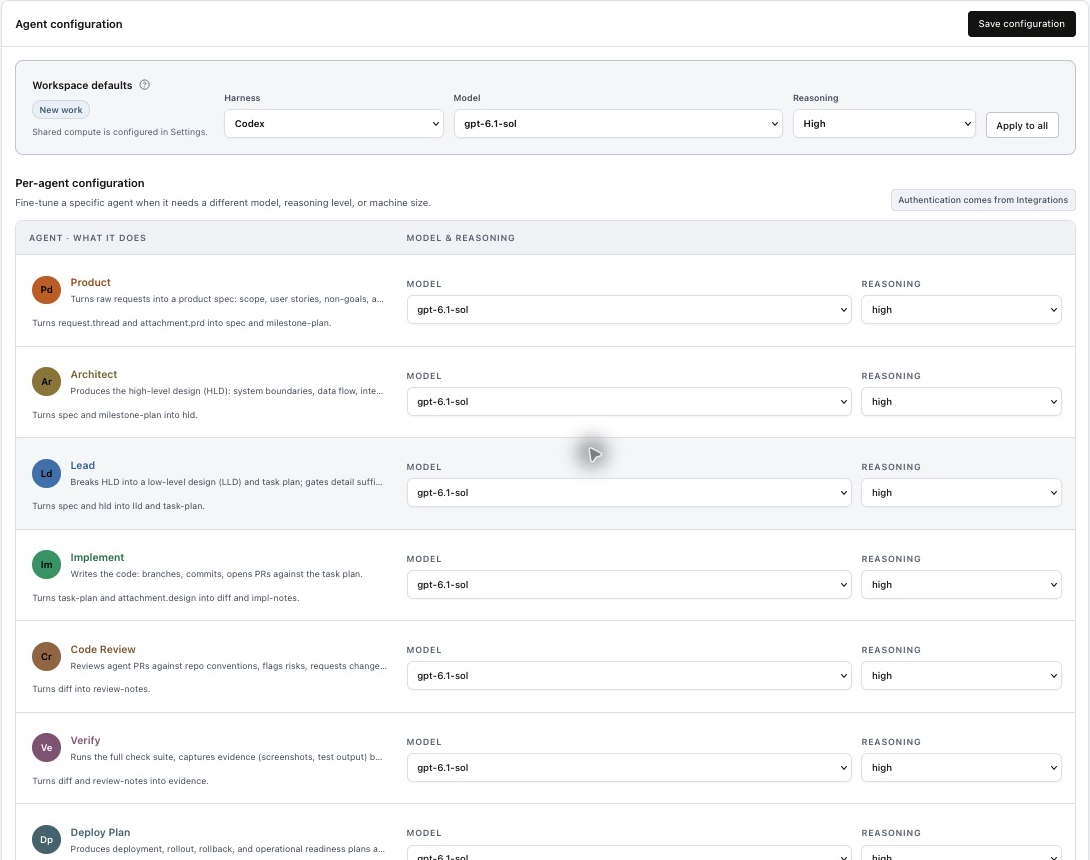
The Agent configuration panel is the source of truth for model execution choices.
- 2Select a provider and model
Choose from the model profiles authorized for your workspace.
- 3Select reasoning
Only reasoning levels supported by the selected model are available.
- 4Apply to all when useful
Use the default as a starting point, then specialize individual agents.
Configure each agent
Use the per-agent rows to choose each specialist’s model and reasoning level, then select Save configuration. Workspace defaults and Apply to all provide a starting point. Authentication comes from Integrations. Shared Coordinator and separate Verify compute are configured in Settings, rather than on these model rows.
How snapshots work
New sessions and workflow stages snapshot the saved execution configuration. This makes a run reproducible and prevents a later settings edit from silently changing an in-flight agent. Update the configuration before starting the next run when you want the new choice to apply.
Practical guidance
- Start with a reliable default and change one agent at a time.
- Raise reasoning for architecture, difficult debugging, or high-impact review.
- Use stronger compute when the task needs browsers, broad builds, or multiple local services.
- Check Usage after several runs and tune based on observed quality, duration, and cost.