
Run work
Run one specialist in single-node mode
Single-node mode gives one specialist a focused task while keeping the run, context, artifacts, and result auditable.
When to use it
Use a single-node run when one agent owns the outcome and you do not need the complete Product-to-Learning sequence. Common examples include architecture review, pull-request review, focused verification, release preflight, or a bounded analysis.
Start a run
Type @ in the composer to open the specialist picker shown below.
- 1Start a new session
Open Sessions and select New.
- 2Select Build
Direct agent is a build path even when the result is an analysis or review artifact.
- 3Mention the specialist
Type
@and select an agent such as Architect, Code Review, or Verify. - 4Add the target and outcome
Select repository hints and include a pull-request URL or other bounded target when relevant.
- 5Submit
Prinevo creates one durable single-node run owned by the selected specialist.
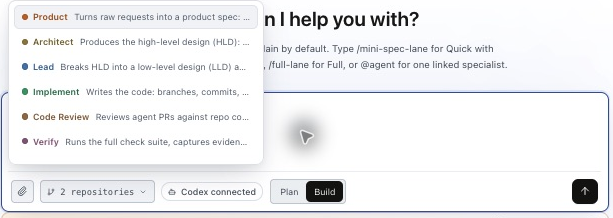
Agent selection and lane selection are different. Typing @ selects one specialist and starts Direct agent work in single-node mode. To run Inline quick, Quick Agent, or Full lane, use the Build lane controls or the corresponding lane command.
QA example: acceptance criteria, scenarios, screenshots, and video · Code Review example and dimensions · Read the resulting artifacts
Examples
@Verify validate pull request 786. Run the relevant tests, inspect the changed contracts, and return the evidence needed to approve or block the merge.@Architect review the proposed billing boundary. Identify cross-service risks and produce a publishable architecture recommendation.Review the result
- Open the specialist’s latest artifact and confirm it answers the requested question.
- For PR work, confirm the repository, PR URL, branch, and revision match your target.
- Inspect findings and check results. A review artifact alone does not prove tests passed.
- Resolve blocking findings or missing access before treating the task as complete. Give feedback in the same session; use the available retry action for a failed attempt.
- Choose the next action explicitly: revise the change, run another specialist, or start the appropriate delivery lane.

Single-node work completes the selected specialist’s task. It does not automatically run the remaining SDLC stages or authorize merge and deployment.
Use a specialist to review or verify a pull request · Recover a failed run
What stays controlled
The selected agent still uses its saved model, connection, reasoning level, compute profile, skills, and tool policy. The run keeps its own status, artifacts, decisions, and completion contract. If the work grows into a multi-stage feature, start or switch to Full lane instead of treating a single specialist as an entire delivery team.