
Get started
Plan a feature before you build
Work through the feature with the Main agent before changing code. Once the plan is ready, keep the context in the session and choose the delivery path that fits the work.
Start in Plan
- 1Open Sessions and select New
Start a session for the feature and select Plan before sending the request.
- 2Describe the feature
Give the Main agent the user outcome, current behavior, known constraints, affected systems, and what a successful change should prove. Add relevant files or links when they supply context.
- 3Ask for a buildable plan
Have the agent identify assumptions, affected components, acceptance criteria, test cases, and any decision you should make before implementation.
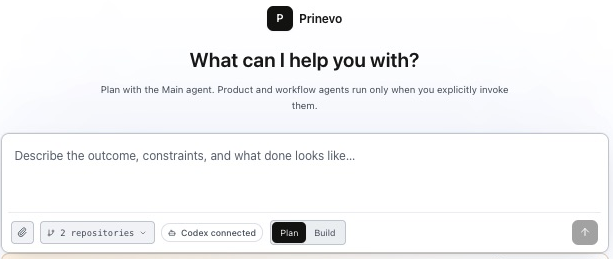
Plan a feature that lets workspace owners invite and remove members.
Members can view settings but cannot change access. Every access change
must have an audit event. Inspect the relevant code and propose scope,
acceptance criteria, edge cases, tests, and the right build lane.
Do not change code yet.
Review the plan
Use the same Plan session to resolve open questions and adjust the proposal. Check that the plan covers the behavior you want, the important constraints, and how the result will be verified. Ask the Main agent to revise anything that is too broad, unclear, or missing before you begin Build.
- Confirm the user-facing outcome and acceptance criteria.
- Review architecture or contract implications and the likely affected code.
- Agree on the tests, review needs, and evidence required before release.
Continue in Build
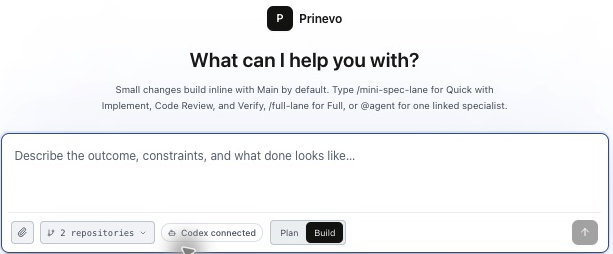
When the plan is ready, switch the session from Plan to Build. Reference the approved plan in your next request and choose how the feature should be implemented. Build continues with the planning context; planning alone does not start implementation.
| Choose | When to use it | What happens |
|---|---|---|
| Inline quick lane | A small, low-risk feature that the Main agent can implement directly. | Select Quick lane in Build. The Main agent scopes, changes code, and runs focused verification. |
| Quick Agent lane | A bounded feature that needs independent code review and verification. | Start with quick agent lane:. Implement, Code Review, and Verify agents work in sequence. |
| Full lane | A meaningful feature needing product, architecture, design, implementation, review, and verification stages. | Select Full lane in Build or use /full-lane to run the coordinated workflow. |
After a session has committed to Build, it does not switch back to Plan. You can still guide the work and review decisions in the active lane.