
Run work
QA and verification
Use the Verify agent to check acceptance criteria, run relevant scenarios, and inspect reports, screenshots, video, and supporting evidence.
Start a QA task
To run QA for an existing PR, open a session, select Build, type @, and choose Verify from the specialist picker. Supply the PR URL, expected behavior, acceptance criteria, and any permitted test target. For automatic QA, enable Enable automatic QA validation in Settings.
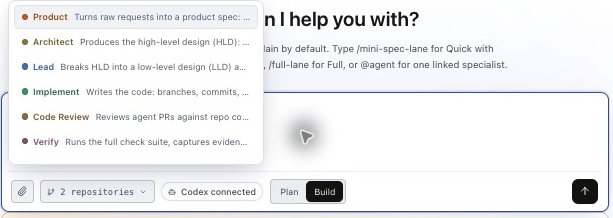
@Verify validate [PR URL].
Acceptance criteria:
1. A completed search with no matches shows “No results found”.
2. Loading remains visible while the request is pending.
3. Failed requests show a distinct error state.
Check keyboard access and narrow-screen layout for this changed flow.
Return criterion-level results, screenshots, and a short flow video
where useful. Report blockers and untested behavior explicitly.Read acceptance criteria and scenarios
Open Verification, select the run, and inspect Acceptance criteria. Each criterion can have scenarios and evidence. Expand a scenario for its expected and actual behavior, execution detail, proof status, and next action. Use filters such as Needs attention, Passed, Failed, Blocked, and Not run.
| Example criterion | Scenario | Expected evidence |
|---|---|---|
| Empty results remain distinct from loading | Complete a search with zero matches | Screenshot of the empty state and recorded result. |
| Errors remain distinct from empty results | Make the search request fail | Error-state screenshot and supporting request or log evidence. |
| The changed flow supports keyboard input | Search and inspect results using the keyboard | Scenario steps and result; video when useful. |
Inspect screenshots, video, and reports
Open All evidence to browse Screenshots, Videos, and Supporting evidence. Preview an item to inspect the proof. The run also links its Accepted criteria document and Execution results document.

- Screenshots: show a relevant state, such as validation, empty results, or a layout issue.
- Video: shows a sequence where transitions or interaction matter. A video is available when it was captured and published for that run.
- Supporting evidence: can include logs, API results, scenario records, and execution output.
Not every run includes every media type. Ask for the proof the task needs and confirm it exists rather than treating a requested video as a delivered artifact.
Assess the QA outcome
Check reported test totals, criterion statuses, scenario coverage, and evidence freshness together. A Passed test can still have incomplete proof or missing evidence. Review Blocked, Not run, unavailable evidence, and coverage gaps before approving the result.
Fix findings and rerun affected checks against the current revision. Workspace access is required to open linked evidence.