
Manage
Manage project skills
Project skills add company-specific instructions, checklists, and playbooks to the agents that need them.
How skills compose
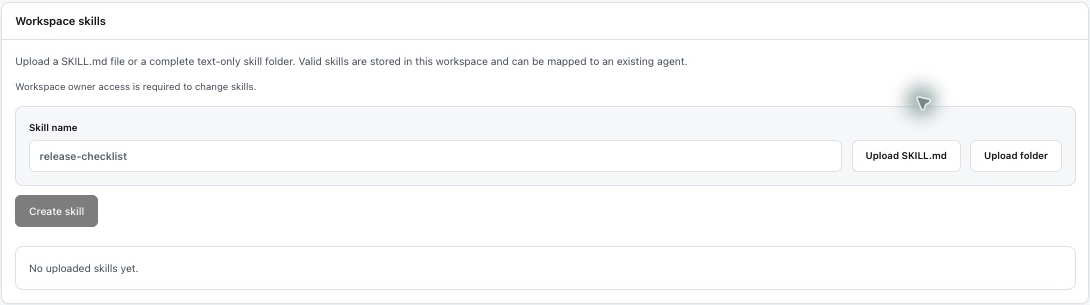
Open Agents and scroll to Workspace skills. Enter a skill name, choose Upload SKILL.md or Upload folder, then select Create skill. The UI accepts a SKILL.md file or a complete text-only skill folder; valid skills are stored in the workspace and can be mapped to an existing agent. Workspace owner access is required.
Prinevo resolves locked platform skills first, then attaches approved customer add-on skills for the selected agent. Add-ons are additive. They extend a specialist with your engineering standards without copying or replacing the platform baseline.
Good skill content
A project skill should encode a reusable way of working rather than one feature request. Useful examples include an architecture checklist, API compatibility rules, repository-specific test commands, migration review requirements, or a release evidence checklist.
Name: Billing API compatibility checklist

When changing a public billing contract:
- Identify every consumer before implementation.
- Preserve backward compatibility during rollout.
- Add contract tests for old and new payloads.
- Include migration and rollback evidence.
Safety boundaries
Project skills cannot disable locked platform skills, bypass approval gates, grant tool access, weaken tenant isolation, or remove required security review. Prinevo validates the resolved skill pack before enabling a customer add-on for an agent.
Run behavior
Each run captures which standards and skill content were active at start, including content hashes. This gives reviewers an audit trail and prevents later edits from silently changing the meaning of an existing run. Feedback and repeated gaps may create improvement candidates, but skills are not changed automatically without review.