
Use cases
Automate code review when a PR is raised
Keep your existing pull-request workflow and let Prinevo’s Code Review agent inspect changes when verified PR events reach the workspace.
Use it for an independent review pass
Use automatic review when you want specialist feedback on a pull request before the team merges it. The agent examines the implementation against its intended behavior, relevant codebase context, and the risks introduced by the change.
Connect the prerequisites
Connect GitHub or Bitbucket and an agent provider in Integrations. Select the repositories for your product and let Factory setup prepare them automatically. Review and merge any required setup PRs in their respective repositories. Configure models in Agents and compute in Settings.
Connect the source-control provider’s PR webhook and confirm access to the selected repositories. The provider connection supplies repository access; the webhook delivers events.
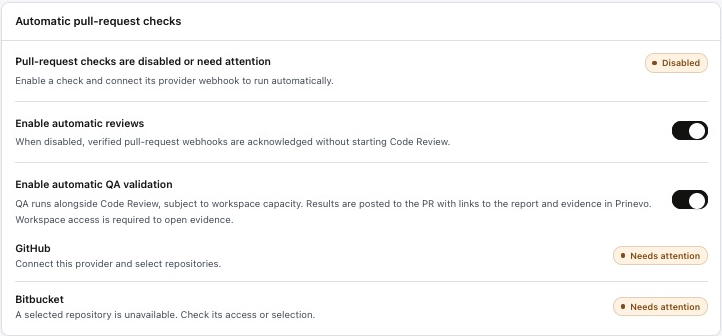
Enable automatic reviews in Settings
- Open Settings.
- Find Automatic pull-request checks.
- Enable Enable automatic reviews.
- Read the provider readiness messages. Resolve missing webhook connections, authentication, or repository selection before expecting a run.
Try it with one clear pull request
Open a small PR in a selected repository using your normal process. Include what changed, the intended behavior, the ticket or acceptance criteria, and the checks already run. Confirm the corresponding review starts in Prinevo and targets the intended PR revision.
Example PR context
Change: prevent workspace members from inviting other users.
Expected: only owners can create invitations through the UI and API.
Review focus: server authorization, denied responses, and regression tests.
Checks already run: [actual commands and results].
This is an example of useful review context, not a finding from a captured customer run.
What to inspect in the result
Open the review output associated with the PR or session. Actionable findings should identify the source location, affected behavior, impact, and supporting evidence. Resolve blocking issues before treating the change as ready.
- Correctness: does the implementation match the requested behavior, including edge cases?
- Contracts and architecture: are ownership, interfaces, and compatibility preserved?
- Security: are permissions, inputs, isolation, and secrets handled appropriately?
- Tests and runtime: do checks cover the behavior and realistic failure paths?
Review depth follows the changed surface. See all Code Review dimensions. If the code changes after review, confirm the relevant review is repeated for the updated revision. Automatic review provides evidence for your decision; repository merge approvals still apply.
If no review starts
Check the review switch, provider webhook, repository access, and readiness messages. Keep the existing failed run when recovering an execution failure. To request one focused review manually, type @ in Build and select Code Review.
Run one specialist · Recover failed work · Add automatic QA testing