
Run work
Code Review: dimensions and findings
Use the Code Review specialist to inspect a pull request against its scope, contracts, risks, and codebase conventions.
Run a review
Start a session, select Build, type @, and choose Code Review. Provide the exact PR URL and the ticket or acceptance criteria. You can also enable automatic reviews from Settings.
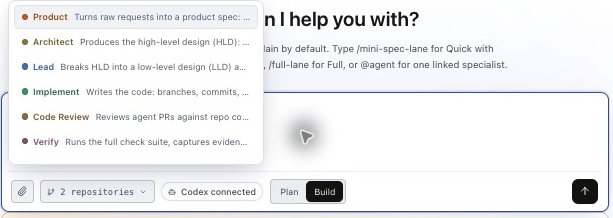
@Code Review inspect [PR URL] against these acceptance criteria: [...].
Review the latest revision. Return actionable findings with file locations,
severity, affected behavior, and the evidence supporting each finding.
Identify unresolved questions and missing verification.
Review dimensions
Review depth follows the changed behavior and risks. Applicable dimensions receive focused attention; a small diff can still change an important boundary.
| Dimension | Questions to answer |
|---|---|
| Correctness and scope | Does behavior meet the requirements, including edge cases? |
| Architecture and ownership | Does the change preserve module boundaries and put responsibilities in the right place? |
| Frontend and UI | Are route, component, state, and accessibility responsibilities handled correctly? |
| API and contracts | Do request, response, and event shapes remain compatible? |
| Data and migrations | Are schema, data ownership, and migration assumptions safe? |
| Security and privacy | Are authorization, isolation, inputs, secrets, and logging handled appropriately? |
| Configuration and infrastructure | Will settings and runtime wiring work in the intended environment? |
| Tests and evaluations | Do checks cover the changed behavior and realistic failure cases? |
| Runtime and observability | Can failures be detected and diagnosed with useful evidence? |
| Language and maintainability | Are types, error handling, idioms, and responsibilities clear? |
| Failure modes | Are timeouts, retries, concurrency, and partial failures handled? |
| Rollout and compatibility | Can the change coexist with older components and be rolled back? |
Read and resolve findings
A useful finding names the affected behavior, source location, impact, and evidence. Distinguish an actionable defect from an open question or a non-blocking improvement. Resolve blocking findings, then review the updated revision.
Code review and QA serve different purposes: review examines implementation and risk; QA checks behavior and execution evidence. Automatic QA can run alongside automatic Code Review, subject to capacity.
Read QA results · Enable automatic PR checks · Inspect artifacts