
Get started
Set up your Factory
Connect the repositories that make up your product. Prinevo prepares repository context and opens a setup pull request in each repository that needs changes. Your team reviews and merges those PRs in their respective repositories.
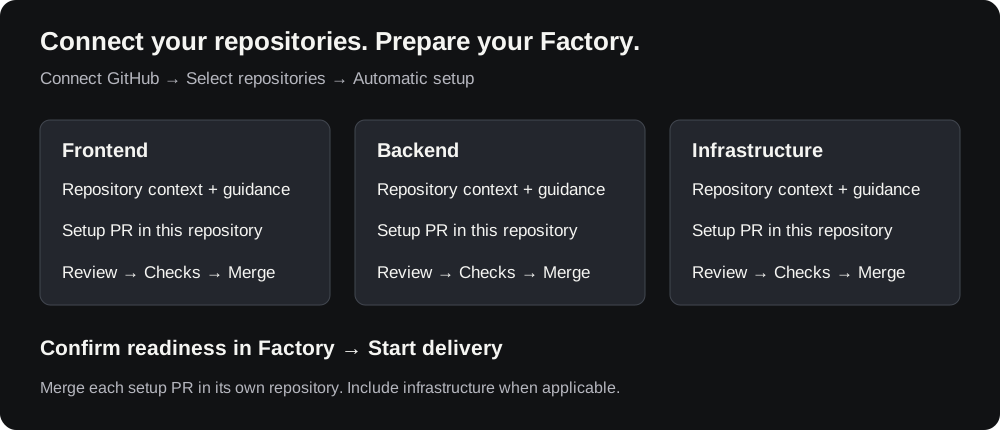
Open app.prinevo.ai to get started. Invite teammates from Settings so they can sign in and collaborate. Once repositories are ready, enable automatic PR review and QA validation in Settings.
1. Connect all relevant repositories
Open Integrations and connect your source-control provider (GitHub or Bitbucket) for the organization that owns your code. During repository selection, include every repository needed to understand and deliver changes to your product: frontend, backend, shared packages, and infrastructure where applicable.
- Complete your provider’s connection or installation flow using an account with the required organization access.
- Grant access to the repositories you want Prinevo to work with.
- Select those repositories for the Factory and confirm the selection.
- Open Factory and check that the intended repositories are listed and enabled.
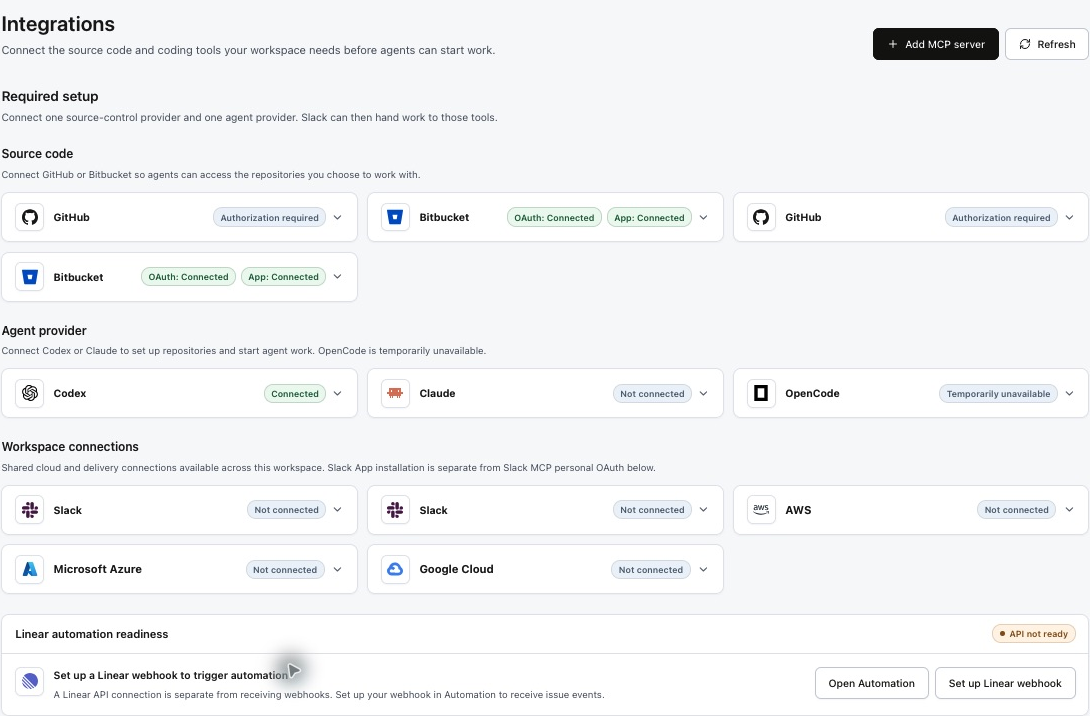
Connecting source control and selecting repositories are separate steps. A successful connection does not automatically give access to every repository in the organization.
2. Follow automatic setup in Factory
Repository setup starts automatically from the Factory page after you connect and select your repositories. Follow setup progress there. You do not need to run a command or send a setup request in a session.

Prinevo inspects each repository to capture its architecture and infrastructure context, then prepares guidance for agents working in that codebase. Setup can include coding guidelines, testing guidance, and agent instructions appropriate to that repository. Existing guidance should be reviewed and preserved where relevant.
Each repository has its own setup outcome. Review the repository-specific findings and any missing context rather than treating a successful scan of one repository as completion for the whole Factory.
Read setup progress on the Factory page
Open Factory in the app. This page brings repository access, setup, and analysis together. Repository setup is automatic; the page shows what is ready and what needs your attention.
| Factory control or status | What it means |
|---|---|
| Check status | Fetch the latest setup and pull-request status, including after you merge setup PRs. |
| Refresh | Refresh the Factory; the page notes that this retries enabled repositories, including failed repositories. |
| + Add repository | Open repository selection to add another source-control repository. |
| Source control | Open Integrations to manage the provider connection. |
| Setup actions | Expand the panel to inspect outstanding setup actions and use Configure for the related integration setup. |
| Overall factory status | Read availability, Repository setup, and Analysis separately. A repository being available does not guarantee setup and analysis are complete. |
| Ready for build / Setup current | The repository is available for work and its setup is current. The row can show the session base branch and revision. |
| No setup pull request needed | The repository is already current. There is no new setup PR to merge for that result. |
| Setup needs attention / Retry setup | Read and resolve the repository-specific issue, then use Retry setup. Repeating a retry does not fix missing access. |
If Factory setup required appears with a Set up factory button, follow that onboarding action to create the Factory runtime. This is separate from manually starting a repository scan or sending a setup command.
Environment credentials
The Environments section has Development, Staging, and Production tabs. When runtime work needs credentials, select the intended environment, enter the credential key and value, and use Save credential. Values are write-only and are not shown again after saving. Review the metadata for the selected environment; never place credential values in a PR or documentation.
3. Review and merge each setup PR
Prinevo opens a draft setup PR for each repository that needs setup changes. Open each PR in its source-control provider, review its diff, resolve feedback, and merge it into the intended base branch using that repository's normal review process.
| Repository | Setup artifact | Your action |
|---|---|---|
| Frontend | Setup PR in the frontend repository | Review frontend guidance and checks; merge there. |
| Backend | Setup PR in the backend repository | Review service and testing guidance; merge there. |
| Infrastructure, when selected | Setup PR in the infrastructure repository | Review ownership and operational guidance; merge there. |
Merge PRs individually. Merging the frontend setup PR does not merge the backend or infrastructure setup PR. Track the outcome for every selected repository.
- The PR targets the expected repository and base branch.
- The guidance matches the repository's actual stack, conventions, and test commands.
- Existing instructions remain consistent with the proposed changes.
- Required reviewers and branch checks are satisfied before merging.
- Missing access or scan gaps have an owner and a clear next action.
These setup PRs prepare repositories for agent work. Feature implementation produces separate changes and pull requests.
4. Confirm Factory readiness
Return to Factory after merging the setup PRs and check the latest repository setup information. Use Check status to fetch the latest setup and PR state. If the view is stale, refresh it; if setup still reports an issue, inspect the relevant repository result before retrying.

- Every intended repository is connected and enabled.
- Each required setup PR is merged, or the repository explicitly says no setup PR is needed. Outstanding setup work is understood.
- Repository context and any available Factory analysis reflect the selected repositories.
- Agents have active provider connections, model settings, and compute profiles.
- A first bounded run can inspect the intended codebase and produce reviewable verification evidence.
Ship a first change with Quick lane · Automate the SDLC with Full lane · Start from a ticket
Resolve setup issues
| Problem | What to check |
|---|---|
| A repository is missing | Check GitHub installation access, repository selection, and Factory enablement. |
| No setup PR appears | Inspect that repository's setup outcome. Setup may need input, fail on access, or have no new changes to propose. |
| A setup PR has conflicts or failing checks | Resolve the issue on that repository's setup branch and rerun its required checks before merging. |
| Only some setup PRs are merged | Review the remaining repositories individually. Keep their status visible to the team. |
| Factory still shows old setup information | Refresh and inspect the latest setup result. Use the available recovery action for a failed step. |