
Run work
Automate Linear tickets to pull requests
Start agent work automatically when a Linear issue matches a label-based rule. Configure the webhook and execution rule from Automation.
Create the webhook connection
- Open Automation at app.prinevo.ai and choose Set up Linear webhook.
- Under Create webhook URL, choose Linear and an endpoint name. Keep
linear-mainunless you need another connection for different projects or teams. - Select Create webhook URL and copy the generated URL into Linear’s webhook configuration.
- As a Linear workspace admin, open Settings → API → Webhooks → New webhook. Paste the URL, select Issues and the intended teams, then save.
- Copy the signing secret from Linear’s webhook detail page. Paste it into the Prinevo setup flow and select Save and activate.
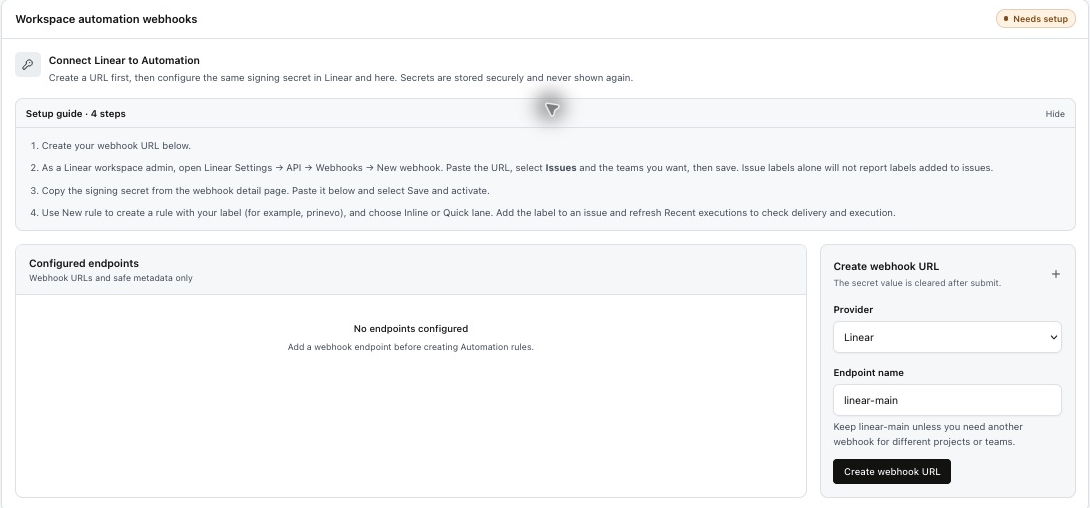
Select Issues events. Issue labels alone will not report labels added to issues. The signing secret is stored securely and is not shown again.
Create a label-based rule
- Select New rule.
- Use the label you want to start work, for example
prinevo. - Choose the execution option shown in the rule editor: Inline or Quick lane.
- Include a clear outcome, repository context, acceptance criteria, and PR expectations in the issue.
- Add the matching label to an issue and refresh Recent executions to check delivery and execution.
Readiness progresses through Webhook URL, Signing secret, First rule, and First execution. Confirm the first execution before relying on unattended intake.
Example ticket
Title: Show an empty state after a search with no results
Label: prinevo
Repository: [repository]
Expected: show “No results found” after a completed empty search.
Acceptance criteria:
- Loading is shown while searching.
- An empty result shows the empty-state message.
- A failed request shows an error, not the empty state.
Done: draft PR with a ticket reference and verification evidence.
Webhook delivery and agent access
The webhook starts work when an event matches a rule. A Linear API or MCP connection lets agents access issue context and tools; it is separate from receiving webhooks. Check Linear automation readiness in Integrations and configure the required tool access.
Connect MCP tools · Understand ticket-to-PR delivery · Enable automatic PR checks